

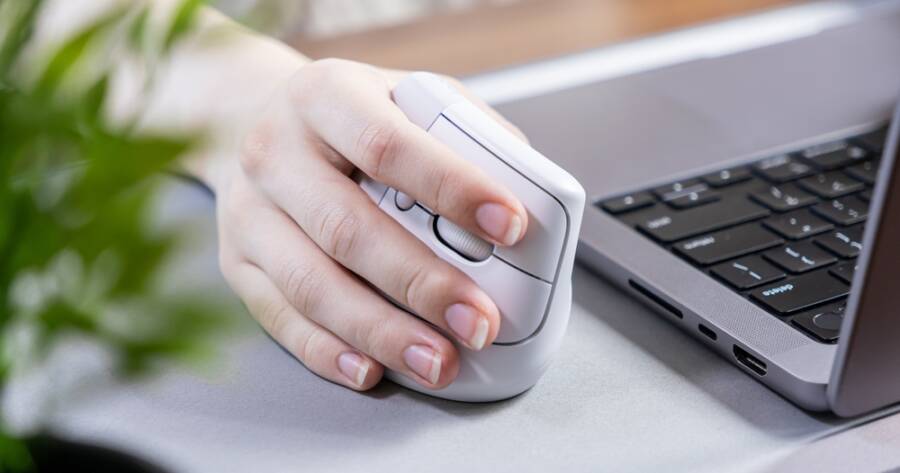
Many people who use computers for work or hobbies experience wrist discomfort, often without realizing it. Traditional computer mice position the wrist in a flat, rotated stance that can add pressure on small joints and tendons over time. Ergonomic vertical mice offer a different approach by placing the hand in a more natural, handshake-style orientation that aims to ease tension. For those who spend hours at a desk, understanding how vertical mice work can reduce your wrist discomfort.
What Makes a Vertical Mouse Different
A vertical mouse is shaped so that your hand sits on its side rather than flat on top, similar to the way you might shake someone’s hand. Traditional mice require the forearm to twist inward, which can strain muscles and tendons over hours of use. By contrast, the vertical design keeps the wrist in a more neutral position, which reduces the amount of pronation — that inward rotation — needed to move the cursor.
This change in forearm position helps distribute effort across larger muscles instead of forcing smaller wrist muscles to work harder. For many users, this relaxed position feels more natural and requires less tension, which can ease wrist fatigue especially when performing repetitive tasks.
How Wrist Strain Develops With Traditional Mice
Wrist strain commonly develops when the wrist stays bent or twisted for long periods. With a standard flat mouse, the hand rests palm down, which twists the forearm and places continuous pressure on the wrist joint. Over time, this position can contribute to irritation of tendons and soft tissues around the wrist and forearm.
For people who click, scroll, and drag many times each day, that repetitive strain can build and lead to discomfort or even prolonged pain. Factors like desk height, keyboard placement, and posture also contribute, but the mouse position is a core issue because it directly influences how the wrist must be held while navigating the screen.
Why Vertical Mice Help Reduce Strain
The primary advantage of an ergonomic vertical mouse is the way it realigns the wrist and forearm. When you grip a vertical mouse, your palm faces inward toward your body, which is closer to how the arm naturally rests. This neutral position tends to reduce twisting at the wrist and allows larger muscles in the forearm and shoulder to share the movement load. By reducing the demand on smaller muscles and tendons, vertical mice can help lower the risk of irritation that leads to strain or discomfort.
In addition, vertical mice often encourage improved posture. Because the hand is positioned differently, users may become more aware of how they sit at their desk, which can lead to less shoulder hunching and lower neck tension. When the entire upper limb is aligned more naturally, the cumulative effect can be less overall discomfort during long computer sessions.
Choosing a Vertical Mouse That Works for You
Not all vertical mice feel the same, and comfort can vary by hand size, grip style, and how you use your computer. Some models offer a more pronounced angle, while others are gentler in their tilt. It helps to choose a design that feels natural when you first grip it rather than forcing your hand into an unfamiliar position.
Button placement and scroll wheel accessibility matter as well. Since vertical mice position the hand differently, buttons will feel shifted compared to a traditional mouse. Look for a layout where your fingers can rest comfortably on buttons without extra reaching. If possible, testing a few shapes helps identify what feels easiest for your wrist and hand.
Sensor type and sensitivity also play a role, especially if you use your mouse for detailed work like photo editing or design. A responsive sensor that tracks smoothly reduces the need for extra wrist movement, which further supports reduced strain.
Adjusting to a Vertical Mouse Takes Time
Switching from a traditional mouse to a vertical one often requires a short adjustment period. Because your muscles are working in a slightly new way, initial use may feel unfamiliar or even awkward. For most people, this phase lasts only a few days to a couple of weeks as the hand and arm adapt to the new orientation.
During this transition, it helps to make incremental adjustments rather than forcing long hours immediately. Shorter sessions using the vertical mouse combined with breaks can ease the adaptation and help your muscles learn the new movement pattern without strain. Over time, many users find they rely less on compensatory movements like lifting the shoulder or rotating the wrist, which supports longer periods of comfortable use.
Combining Ergonomic Tools for Best Results
A vertical mouse can significantly reduce wrist strain, but comfort often comes from a combination of ergonomic choices. Pairing the vertical mouse with a properly positioned keyboard, a chair that supports good posture, and a desk at the right height creates an overall setup that minimizes strain throughout the upper body. Taking regular breaks, doing gentle hand and arm stretches, and maintaining neutral posture can further enhance comfort and reduce long-term discomfort.
Ensuring that your monitor is at eye level and that your forearms are roughly parallel to the floor also supports a relaxed position. Many people experience the most relief when ergonomic adjustments are made together, rather than focusing on a single item in isolation.
A Tool That Makes Daily Computer Use Easier
Ergonomic vertical mice can reduce wrist strain by allowing the hand and forearm to stay in a more natural alignment, which decreases stress on smaller muscles and tendons. For people who spend significant time at a computer, this change in position often leads to noticeable improvements in comfort, especially during long work sessions.
While adapting to a vertical mouse takes a bit of time, the long-term benefits for wrist comfort can be significant. Combined with thoughtful workstation setup and gentle movement breaks, vertical mice are a useful tool for supporting healthier, more comfortable computer use.